

For architecture, engineering & construction firms

Run every project from brief to handover.

Moredular gives your practice one workspace for drawings, tasks, snags, NCRs, change requests and contracts — so the project record stops living in a chat thread, a printed file and somebody's laptop.

No card required to start Pay with Airtel Money, MTN MoMo or card Works on site, on a phone
Each firm in its own workspace Permissions per module and role PDF & Excel reporting Mobile Money subscriptions Email notifications Nothing to install
Modules

25 modules, grouped the way a practice works

Start with projects and clients, add snags and NCRs when the site opens, and switch on the controls your contracts call for. Give each member only the modules they need.

Controls

Registers that match contract practice

Every instruction, defect and variation gets a number, an owner and a status, so the trail outlives the meeting it was raised in.

  • Snags raised against the drawing, then routed for approval and sign-off.
  • Non-conformance reports follow a five-step workflow and print in the layout your client expects.
  • Change requests carry their cost and time impact before anyone agrees to them.
  • Contracts keep payment terms and value breakdowns next to the work.
Site controls register
Documents

Drawings, documents and revisions

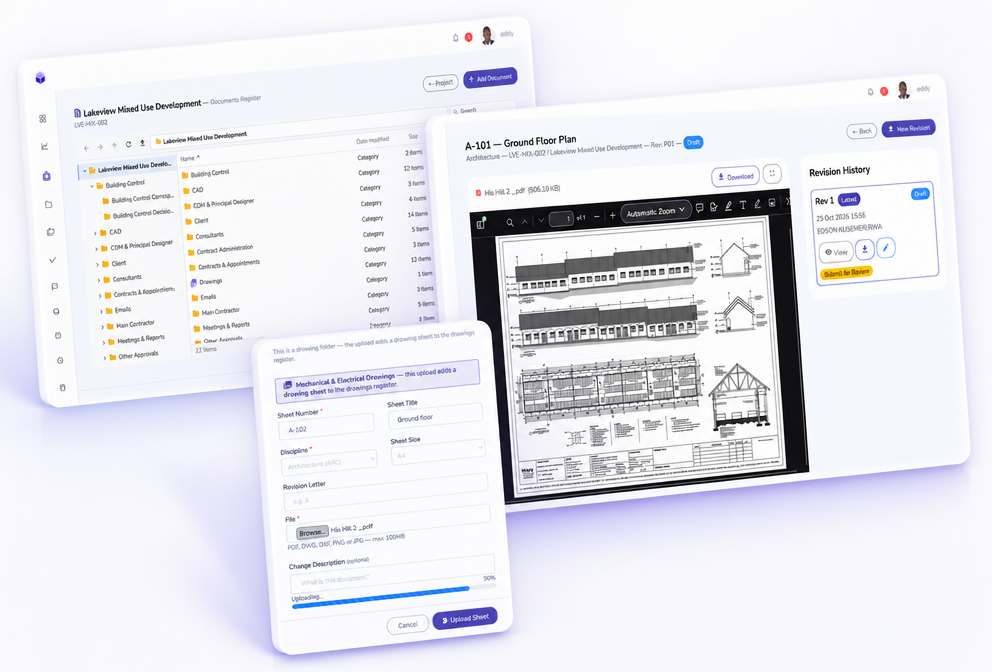
The register knows which revision is current, so the site is never building from a superseded sheet.

  • A drawing register with sheets, revisions and issue status.
  • Folder templates so every project files the same way from day one.
  • A viewer for each document, with its revision history.
  • Site diaries, visitor logs and RACI matrices you can print or hand over.
Project folder and drawings
People

Access that matches responsibility

An owner sees the whole practice. The site engineer sees the site. Nobody sees their own firm's data from the wrong angle — and no other firm sees it at all.

  • Roles with view or manage permission, per module.
  • Team and companies registers for staff, contractors and consultants.
  • RACI assignments per activity, exported as a matrix.
  • Timesheets and KPIs, so effort stays visible against the targets.
Team and permissions
Built for your discipline

One project record, read the way each team reads it

The architect tracks deliverables, the engineer tracks non-conformances, the contractor tracks the programme. Everyone works from the same registers, filtered to what their role actually needs.

Architectural elevation with a dimension line, north arrow and drawing scale

Architecture

Drawings, deliverables and client approvals with the revision trail intact, so nobody issues from a superseded sheet.

  • Drawing register
  • Deliverables
  • Client sign-off
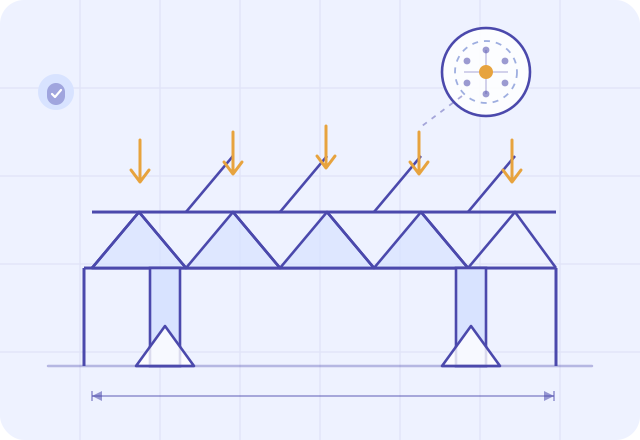
Structural truss diagram with load arrows, supports and a connection detail

Engineering

Issues, non-conformance reports and the design change trail, with the cost and time impact recorded before the work moves on.

  • NCRs
  • Change requests
  • Risk register
Construction site with a tower crane, a concrete frame and a hard hat

Construction

Site diaries, snags, visitors and timesheets captured on a phone the same day, then printed as the record the client expects.

  • Snags
  • Site diaries
  • Visitors & timesheets
How it works

From site diary to signed-off record

The same chain of records a well-run project produces on paper — only this time it is searchable, and everybody works from the same version.

1
Log the day

Labour, plant, weather and progress go into the site diary; visitors sign the gate log.

2
Raise the defect

A snag or non-conformance report goes against the drawing, with a named owner.

3
Agree the variation

The change request records cost and time impact before the work proceeds.

4
Sign it off

Deliverables and approvals move through their steps until the record is closed.

5
Report it

Pull the register or the report as PDF or Excel for the client meeting.

Pricing

Plans that scale with the practice

Every plan includes the full module set and a 14-day free trial. Prices are in Ugandan Shillings. Pay with Airtel Money, MTN MoMo, Visa or Mastercard.

Starter

Perfect for small firms getting started.

UGX
50,000 / month
498,000 / year
5 users 5 projects 10 GB storage
  • Every module, from projects to NCRs
  • Clients, companies and team register
  • PDF and Excel reporting
Start free trial

Business

Unlimited project management for established firms.

UGX
175,000 / month
1,743,000 / year
50 users Unlimited projects 500 GB storage
  • Everything in Professional
  • Unlimited projects
  • Budget, KPIs, RACI and lessons learned
Start free trial

Enterprise

Custom controls, governance, and dedicated support.

Custom
Priced for your firm
Unlimited users Unlimited projects
  • Everything in Business
  • Custom user and storage limits
  • Onboarding, migration and dedicated support
Talk to us

14 days free on every plan · no card required · change or cancel your plan at any time from your subscription page.

FAQ

Questions practices ask us

How long is the free trial?

Every plan starts with 14 days free. You can create your organisation, invite your team and run a real project before you pay anything — no card is needed to start.

How do we pay?

Subscriptions are billed in Ugandan Shillings. Pay with Airtel Money, MTN MoMo, Visa or Mastercard, monthly or yearly. Choosing yearly saves roughly 17%.

Is our work separated from other firms?

Yes. Every organisation works inside its own workspace, with its own projects, clients, documents and people. Members only reach the modules their role allows.

Can several people work on the same project?

That is what the permissions are for. Invite each member, give them a role, and choose the modules they can view or manage — the quantity surveyor, the site engineer and the principal each get a different view of the same project.

Can we get our data out?

Reports download as PDF or Excel, and the documents your clients already expect — non-conformance reports, site diaries, visitor registers and RACI matrices — print from the system in their own layouts.

Do we need to install anything?

No. Moredular runs in a browser on desktop, tablet and phone, which is what makes the site diary, snag list and timesheets usable on site the same day they happen.

Put your next project on Moredular

Create your organisation in a few minutes, pick a plan, and start with the registers you need today. The trial gives you two weeks to run something real.

Hi, how can I help you?